
如果说人类最关键的 affordance 是“手”,那对 AI 而言,极有可能是“代码”。
Shunyu Yao 团队年初走红、至今热度不减的 OpenClaw,为 AI Agent 打开了新的想象空间。
若把 2025 视为 AI Agent 的“元年”,那么 2026 很可能迎来智能体真正的商业化起跑线——前提是各行业把 Agent 落地到实际业务中。
站在工程师视角,最务实的问题永远是“怎么实现”。工程框架是应用落地的地基,框架选型是架构设计的第一步。为便于吸收,本稿分为两部分:一 理论篇;二 实践篇。
01 理论篇
Agent = Reasoning + Acting
1.1 基础认知
AI 智能体是以达成目标为导向、能够代表用户执行任务的软件系统,它具备推理、规划、记忆与一定自主性,能够学习、适应并作出决策。
此处引用 Google Cloud 对 AI Agent 的界定,简洁准确。
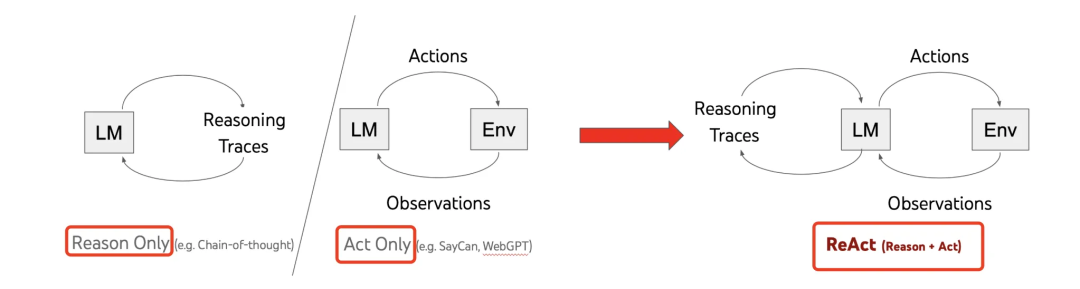
三种典型范式
- ReAct(Reasoning + Acting):由 Yao 等人在 2022 年提出,核心是把推理与行动结合。CoT 强推理但弱交互,ReAct 通过与外部世界互动获得反馈,弥补知识边界。Agent 按回合循环:思考(LLM 推理)→ 执行(调用工具)→ 观察(纳入反馈或输出答案)。
- Plan-and-Execute:基于《Plan-and-Solve Prompting》与 BabyAGI 思想,由 LangChain 团队在 2023 年提出。先完整规划,再按步骤执行,更像结构化 workflow(Planning → Task1 → Task2 → … → Summary),适合依赖关系清晰的长链路任务;缺点是动态调整能力相对弱。
- Reflection:从《Reflexion》《Self-Refine》《CRITIC》等里程碑论文系统化引入“反思/自校正”。不改参数、靠语言反馈与工具验证实现自我改进,在多任务评测中带来显著收益。尽管框架百花齐放,本质仍围绕 ReAct 的“推理+执行”主轴展开。
1.2 主流 Agent 框架对比与选型
- LangChain:生态最全、上手快,适合复杂应用原型;支持多家 LLM、向量库与工具调用,文档与社区完善。
- LlamaIndex:专注数据索引与检索,RAG 能力突出,擅长知识密集型场景。
- AutoGPT / AutoGen:面向多 Agent 协作,支持对话式分工与协作,适合复杂任务拆解与联动。
- CrewAI:角色驱动的协作框架,每个 Agent 具备清晰角色与目标,适合模拟团队协作。
- LangGraph:基于状态图的流程控制,易于构建状态管理清晰、流程复杂的 Agent。
- Semantic Kernel:微软推出的轻量化框架,插件化设计,多语言支持,与 Azure 生态集成顺畅。
建议:快速出原型优先 LangChain;做 RAG 选 LlamaIndex;多智能体协作选 AutoGen/CrewAI;流程复杂选 LangGraph;.NET 生态优先 Semantic Kernel。伴随 Claude Cowork(通用 Agent)兴起,基于通用 Code Agent SDK 的“套壳”应用(如 CodeBuddy Agent SDK 衍生的 WorkBuddy)也在走红,优势在于面向具体用户场景提供更优的交互与工作流设计。
1.3 框架之“核”与行业共识
Monica 团队的 C 端产品 Manus 一度出圈,推动大众认识 Agent 产品。其在人机交互上勾勒出 Agent 应用的雏形;在工程层面,Manus 放弃微调路线,转向“上下文工程”(Context Engineering),并提出“使用文件系统作为上下文”的经验。随后 2025 年 10 月,Anthropic 推出 Claude Skills,“文件系统即上下文”逐渐成为行业共识。
Manus 还提到“inspired by CodeAct”。CodeAct 来自 UIUC 王星尧博士团队(《Executable Code Actions Elicit Better LLM Agents》),主张以可执行代码统一行动空间:Function Call 与 MCP 只是方式之一,直接“写代码-执行”往往更有效。2025 年 11 月,Anthropic 发文提出把 MCP 服务器作为“代码 API”来暴露,Agent 通过写代码与 MCP 交互,按需加载、节省上下文,效率更高。这与“AI 的关键 affordance 是代码”的观点不谋而合。
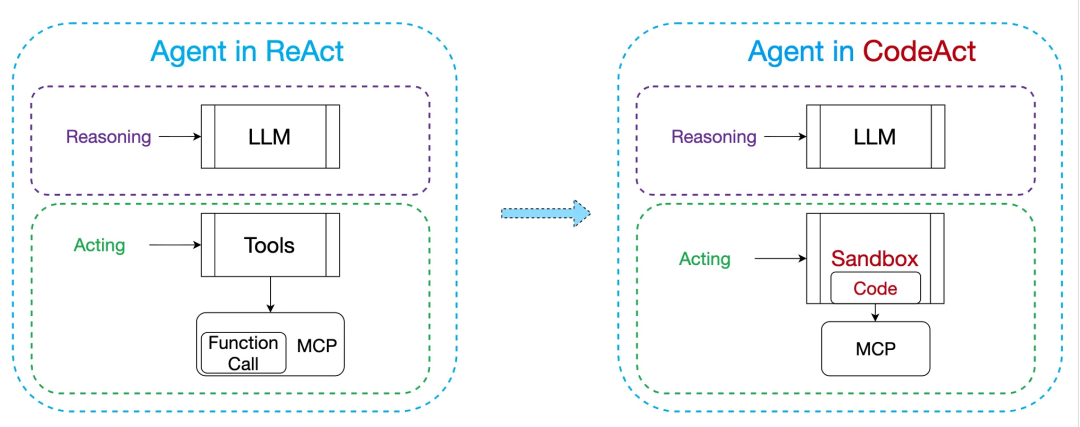
两点业内共识:
- 用文件系统做上下文(如 OpenClaw 的 SOUL.md / TOOLS.md / MEMORY.md 等长期记忆)。
- 编程是通用解题路径:问题 → 生成代码 → 执行 → 再迭代,直到收敛。
归根结底,Agent 的“推理”是 LLM Call,“执行”是 Tools Call(代码也是工具的一种);连接两者的“上下文工程”才是框架智能的关键变量。Shunyu Yao 团队在腾讯混元官网文章中指出:“走向高价值应用,核心瓶颈在于能否用好 Context。”在不提供任何上下文的情况下,先进模型 GPT-5.1(High)可解任务不到 1%。一句话:上下文工程仍是当前 Agent 应用的低垂果实。
1.3.1 三大组成
- LLM Call:统一调用多家 LLM 的 API 细节及流式等基础能力(可参考 LiteLLM)。
- Tools Call:让 LLM 能调用外部工具(Function Call / MCP / Shell / 代码执行 / 文件 / 网络等)。
- Context Engineering:狭义指 Prompt 工程(Rules、Claude.md、AGENTS.md…);广义包含工具+提示协同(如 Skills)。
其中,LLM 调用与工具清单已有较多最佳实践;最大的不确定性与提升空间在上下文工程。
1.3.2 Agent Loop
Agent Loop 是运行时“引擎”,本质是一个 while 循环:每一回合(Turn)进行一次 LLM 推理、工具调用与上下文处理,直到任务完成。
典型流程:
- 初始化上下文(系统提示词 + 用户请求)。
- 进入 Agent Loop:读取上下文 → 思考 → 决定行动。
- 执行工具 → 获得结果。
- 将结果追加至上下文 → 继续或结束。
核心一句话:Agent 框架设计的关键,就是在 Agent Loop 中设计“如何组织与管理上下文”。
02 实践篇
围绕“Agent Loop 内的上下文管理”,以下给出一个“极简但五脏俱全”的单文件实现(约 279 行),便于快速理解与试跑。
2.1 架构总览
从上到下分为三层:
- 用户界面:CLI REPL,负责输入/退出/清屏与消息历史管理。
- Agent Loop Core:LLM 调用 → 工具解析与执行 → 结果回填 → 上下文管理。
- Tools Registry:四类工具(shell、file read、file write、python exec)与对应 schema。
2.2 三要素设计
2.2.1 LLM Call
- 示例使用 DeepSeek 的
deepseek-chat模型。 - 调用方式采用 OpenAI 标准 SDK,便于替换与扩展。
- 为突出可读性,采用同步、非流式调用。
2.2.2 Tools Call
极简工具集,覆盖文件、Shell、Python 代码执行:
shell_exec:执行 shell 命令,返回 stdout/stderr。file_read:读取文件内容。file_write:写入文件(自动创建父目录)。python_exec:在子进程执行 Python 代码,返回输出。
注册方式为手动字典映射:name → (function, OpenAI function schema),以便解析 LLM 响应时找到对应工具。Schema 遵循 OpenAI Function Calling(Tools API)格式。
2.2.3 Context Engineering
- System Prompt:极简说明工具清单与 ReAct 思考方式。
- 会话管理:
messages列表(OpenAI chat 格式)承载系统提示、用户消息、助手响应与工具结果。
2.3 代码实现
2.3.1 Agent Loop 与上下文
MAX_TURNS = 20

def agent_loop(user_message: str, messages: list, client) -> str:
    """
    Agent Loop:while 驱动推理与工具调用。
    1) 追增用户消息
    2) 调用 LLM
    3) 若返回 tool_calls → 依次执行 → 把结果写回 messages → 继续
    4) 若直接返回文本 → 退出并返回
    5) 安全上限:MAX_TURNS
    """
    import json

    messages.append({"role": "user", "content": user_message})
    tool_schemas = [t["schema"] for t in TOOLS.values()]

    for _ in range(MAX_TURNS):
        # LLM Call
        response = client.chat.completions.create(
            model="deepseek-chat",
            messages=messages,
            tools=tool_schemas,
        )
        choice = response.choices[0]
        assistant_msg = choice.message

        # 追加 assistant 消息
        messages.append(assistant_msg.model_dump())

        # 无 tool_calls:返回最终答案
        if not getattr(assistant_msg, "tool_calls", None):
            return assistant_msg.content or ""

        # 逐个执行工具
        for tool_call in assistant_msg.tool_calls:
            name = tool_call.function.name
            raw_args = tool_call.function.arguments
            try:
                args = json.loads(raw_args)
            except json.JSONDecodeError:
                args = {}

            tool_entry = TOOLS.get(name)
            if not tool_entry:
                result = f"[error] unknown tool: {name}"
            else:
                result = tool_entry["function"](**args)

            # 回填工具结果
            messages.append({
                "role": "tool",
                "tool_call_id": tool_call.id,
                "content": result,
            })

    return "[agent] reached maximum turns, stopping."
说明:示例模型为 deepseek-chat(支持 Tools,且兼容 OpenAI SDK)。
2.3.2 Tools 实现与注册
import os, sys, json, tempfile, subprocess

# 4 个工具函数
def shell_exec(command: str) -> str:
    try:
        result = subprocess.run(
            command, shell=True, capture_output=True, text=True, timeout=30
        )
        output = result.stdout
        if result.stderr:
            output += "\n[stderr]\n" + result.stderr
        if result.returncode != 0:
            output += f"\n[exit code: {result.returncode}]"
        return output.strip() or "(no output)"
    except subprocess.TimeoutExpired:
        return "[error] command timed out after 30s"
    except Exception as e:
        return f"[error] {e}"

def file_read(path: str) -> str:
    try:
        with open(path, "r", encoding="utf-8") as f:
            return f.read()
    except Exception as e:
        return f"[error] {e}"

def file_write(path: str, content: str) -> str:
    try:
        os.makedirs(os.path.dirname(path) or ".", exist_ok=True)
        with open(path, "w", encoding="utf-8") as f:
            f.write(content)
        return f"OK — wrote {len(content)} chars to {path}"
    except Exception as e:
        return f"[error] {e}"

def python_exec(code: str) -> str:
    tmp_path = None
    try:
        with tempfile.NamedTemporaryFile(mode="w", suffix=".py", delete=False, encoding="utf-8") as tmp:
            tmp.write(code)
            tmp_path = tmp.name
        result = subprocess.run(
            [sys.executable, tmp_path], capture_output=True, text=True, timeout=30
        )
        output = result.stdout
        if result.stderr:
            output += "\n[stderr]\n" + result.stderr
        return output.strip() or "(no output)"
    except subprocess.TimeoutExpired:
        return "[error] execution timed out after 30s"
    except Exception as e:
        return f"[error] {e}"
    finally:
        if tmp_path:
            try:
                os.unlink(tmp_path)
            except OSError:
                pass

# 注册到 TOOLS(OpenAI Tools API schema)
TOOLS = {
    "shell_exec": {
        "function": shell_exec,
        "schema": {
            "type": "function",
            "function": {
                "name": "shell_exec",
                "description": "Execute a shell command and return its output.",
                "parameters": {
                    "type": "object",
                    "properties": {
                        "command": {"type": "string", "description": "The shell command to execute."}
                    },
                    "required": ["command"]
                }
            }
        }
    },
    "file_read": {
        "function": file_read,
        "schema": {
            "type": "function",
            "function": {
                "name": "file_read",
                "description": "Read the contents of a file at the given path.",
                "parameters": {
                    "type": "object",
                    "properties": {
                        "path": {"type": "string", "description": "Absolute or relative file path."}
                    },
                    "required": ["path"]
                }
            }
        }
    },
    "file_write": {
        "function": file_write,
        "schema": {
            "type": "function",
            "function": {
                "name": "file_write",
                "description": "Write content to a file (creates parent directories if needed).",
                "parameters": {
                    "type": "object",
                    "properties": {
                        "path": {"type": "string", "description": "Absolute or relative file path."},
                        "content": {"type": "string", "description": "Content to write."}
                    },
                    "required": ["path", "content"]
                }
            }
        }
    },
    "python_exec": {
        "function": python_exec,
        "schema": {
            "type": "function",
            "function": {
                "name": "python_exec",
                "description": "Execute Python code in a subprocess and return its output.",
                "parameters": {
                    "type": "object",
                    "properties": {
                        "code": {"type": "string", "description": "Python source code to execute."}
                    },
                    "required": ["code"]
                }
            }
        }
    }
}
2.3.3 System Prompt
SYSTEM_PROMPT = """You are a helpful AI assistant with access to the following tools:
1. shell_exec — run shell commands
2. file_read — read file contents
3. file_write — write content to a file
4. python_exec — execute Python code

Think step by step. Use tools when you need to interact with the file system,
run commands, or execute code. When the task is complete, respond directly
without calling any tool."""
2.4 极简 Agent 应用
2.4.1 CLI REPL 界面
def main():
    import os, sys
    from openai import OpenAI

    api_key = os.environ.get("DEEPSEEK_API_KEY")
    if not api_key:
        print("Error: please set DEEPSEEK_API_KEY environment variable.")
        sys.exit(1)

    client = OpenAI(api_key=api_key, base_url="https://api.deepseek.com")
    messages = [{"role": "system", "content": SYSTEM_PROMPT}]

    print("Agent ready. Type your message (or 'exit' to quit, 'clear' to reset).\n")

    while True:
        try:
            user_input = input("You> ").strip()
        except (EOFError, KeyboardInterrupt):
            print("\nBye.")
            break

        if not user_input:
            continue
        if user_input.lower() == "exit":
            print("Bye.")
            break
        if user_input.lower() == "clear":
            messages.clear()
            messages.append({"role": "system", "content": SYSTEM_PROMPT})
            print("(context cleared)\n")
            continue

        reply = agent_loop(user_input, messages, client)
        print(f"\nAgent> {reply}\n")
2.4.2 DeepSeek 注册与 API Key
2.4.3 体验步骤
export DEEPSEEK_API_KEY="sk-xxxxx"
- 问候测试,确认 Agent 能正确回显 System Prompt 意图。
- 示例 1:查询当前目录文件列表(触发
shell_exec)。 - 示例 2:统计当前目录代码行数与 token 数(触发“写代码-执行-回填”闭环)。
你会看到 Agent 在 Loop 中持续调用工具、生成与执行代码,最终输出统计结果。输入 exit 结束会话。
尽管实现极简,但功能并不“简单”:当 Agent 具备文件读写、Shell 与代码执行能力后,它在本机的“工作半径”会显著扩大。OpenClaw 的底层 Agent Core(Pi Agent)在工具层也仅保留四类核心方法(读/写/编辑文件、Shell),其余强大能力通过事件与 Skills 扩展获得。
03 尾声
这个极简版框架在健壮性、安全性、功能性(如流式输出)与优雅性(如工具注册)上仍有大量可打磨空间。但它五脏俱全、路径清晰,足以帮助我们剥离复杂依赖,看清 Agent 的本质。
为何坚持“极简”?一是便于讲透关键路径;二是现实取舍:代码库本身也会成为上下文的一部分,越简洁,噪声越少,Agent 越聪明。
在框架之外、应用之内,上下文工程才是智能的核心(短/长记忆、主动/被动记忆、会话管理、动态 RAG 等),也是商业化落地的关键变量。框架提供底层能力,上下文工程提供土壤,再叠加业务 Skills,Agent 的潜力才能真正释放。
References
- Google Cloud 的定义:https://cloud.google.com/discover/what-are-ai-agents
- ReAct: https://arxiv.org/abs/2210.03629
- Plan-and-Solve Prompting: https://arxiv.org/abs/2305.04091
- BabyAGI: https://github.com/yoheinakajima/babyagi
- Plan-and-Execute: https://blog.langchain.com/plan-and-execute-agents/
- Reflexion: https://arxiv.org/abs/2303.11366
- Self-Refine: https://arxiv.org/abs/2303.17651
- CRITIC: https://arxiv.org/abs/2305.11738
- CodeBuddy Agent SDK:https://www.codebuddy.cn/docs/cli/sdk
- WorkBuddy 应用:https://www.codebuddy.cn/work/
- AI Agent 的上下文工程(Manus):https://manus.im/zh-cn/blog/Context-Engineering-for-AI-Agents-Lessons-from-Building-Manus
- Executable Code Actions(CodeAct):https://arxiv.org/abs/2402.01030
- Code execution with MCP(Anthropic):https://www.anthropic.com/engineering/code-execution-with-mcp
- OpenClaw SOUL.md/TOOLS.md/MEMORY.md:https://docs.openclaw.ai/reference/AGENTS.default
- 从 Context 学习,远比我们想象的要难(Shunyu Yao 团队)
- 底层 Agent Core(Pi Agent):https://lucumr.pocoo.org/2026/1/31/pi/
原创作者|yabo
文章来源:https://mp.weixin.qq.com/s/z1aDaPFhjYb2cv-9bFbdaQ